
















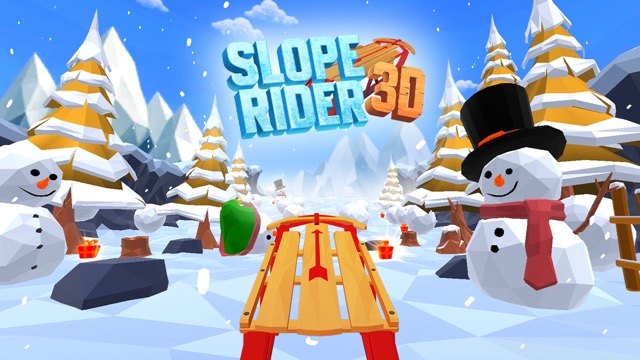
1. Slope Rider 3D Overview
Slope Rider 3D is a full upgrade of the Slope Rider experience — a 3D snowboarding game built around a "curve world" effect that makes every run feel like it's happening on the inside of a globe rather than a flat mountainside. The curved perspective isn't just a visual trick; it changes how terrain reads, how obstacles approach, and how the world feels to navigate at speed. Combined with dynamic fog effects, collapsing trees, unpredictable ice terrain, and a dedicated Hard Mode that ratchets the difficulty to its limit, Slope Rider 3D is the most ambitious winter endless runner in the slope genre.
The sled roster alone sets this game apart. Fifteen-plus unique sleds offer genuinely different play experiences — the default wooden sled provides a balanced introduction, the high-speed model demands 20-30% faster reflexes for the same distance, and stability-focused heavy sleds trade raw pace for better grip through sharp turns and icy patches. Choosing the right sled for your skill level and current goal is a meta-game that most slope variants don't offer.
The environments evolve as you play. Frozen forests give way to narrow ice caves. Vertical drops test your sense of balance mid-descent. The fog rolls in unpredictably, reducing visibility at exactly the moments when it's most dangerous. Daily Missions provide coin and gift box rewards that fund new sled unlocks independently of run performance, and a Login ID system ensures progress carries across devices. Slope Rider 3D is the kind of game you can play seriously across many sessions without feeling like you've exhausted what it offers.
Key Details:
| Genre: | Endless Runner / 3D Snowboarding |
| Difficulty Level: | Medium to Hard (Hard Mode available) |
| Average Play Time: | 5–20 minutes per session |
| Best For: | Winter sports game enthusiasts; players who enjoy sled variety, Hard Mode challenge, and cross-device progression |
How to Play Slope Rider 3D?
Getting Started:
- Select your sled from the garage — start with the default wooden sled if you're new.
- The snowmobile begins descending automatically — steer from the very first second.
- Use Left/Right Arrow keys to steer side to side through obstacles.
- Press Up Arrow or Space to jump over pits and logs.
- Collect coins and gift boxes during each run; complete Daily Missions for additional rewards.
Basic Controls:
| Action | Key |
| Steer Left | ← Left Arrow |
| Steer Right | → Right Arrow |
| Jump | ↑ Up Arrow or Space |
Objective: Navigate the snowmobile as far as possible through the curved winter world without crashing into obstacles or falling into pits. Collect coins and gift boxes to unlock new sleds; complete Daily Missions for additional resources; reach the furthest distance to top the leaderboard.
Slope Rider 3D Features & Highlights
✓ "Curve world" terrain effect — a unique visual perspective that makes the world appear to curve around the player, changing how terrain and obstacles read during a run
✓ 15+ unique sleds — a full garage including beginner-balanced, high-speed, and stability-focused models, each offering a meaningfully different play experience
✓ Hard Mode — a dedicated difficulty mode for players who've mastered the standard descent and want a significantly greater challenge
✓ Dynamic hazards — collapsing trees, falling snow boulders, and dense fog add unpredictable environmental elements beyond static obstacle avoidance
✓ Cross-device progress via Login ID — sled unlocks and scores persist across all devices through the Login ID system
Slope Rider 3D Tips & Strategies
Beginner Tips:
- Start with the default wooden sled regardless of what other options are available — it's balanced by design for players learning the curve world perspective and jump timing.
- The curve world effect changes how distance and speed feel — objects that look far away in a standard slope game may be much closer in the curved perspective. Give yourself more reaction time than the visual distance suggests.
- Jump early rather than late — pits and logs in Slope Rider 3D often appear with less warning than standard slope obstacles. If you're unsure whether a jump is needed, jumping slightly early beats realizing too late that it was required.
Advanced Strategies:
- Match your sled choice to your session goal: use the high-speed sled when chasing distance records (and accept the reflex demand), use stability sleds when grinding Daily Missions that require consistent medium-length runs rather than maximum distance.
- The fog effect is the game's most disorienting dynamic hazard — when fog rolls in, extend your forward scan range and reduce your default speed or input frequency. Less information means more conservative play is safer.
- Hard Mode is most effectively approached after multiple standard-mode runs have made the terrain patterns familiar — the increased difficulty is most manageable when the underlying track geometry is already internalized.
What to Watch Out For:
- Collapsing trees: Unlike static trees, collapsing trees fall toward the track after a brief delay — the tree you see standing isn't where the hazard will be when you arrive. Look for trees that appear to lean or shake as your signal to give them extra lateral clearance.
- Curve world depth misjudgment: The curved perspective occasionally makes obstacles appear further away than they are. When in doubt about an obstacle's actual distance, assume it's closer than it looks and react accordingly.
Slope Rider 3D Elements Explained
Curve World Effect: The curve world visual effect is Slope Rider 3D's defining aesthetic and mechanical differentiator from standard snowboarding games. Rather than a flat receding horizon, the terrain appears to curve downward away from the player as if the world is a sphere and the sled is riding its surface. This effect changes three things: how far obstacles appear to be (they feel further than they are), how the track's geometry reads at speed (curves in the terrain are visually exaggerated), and how immersive the descent feels (the curved horizon creates a sense of actually being in a three-dimensional winter world rather than on a flat surface). Adjusting to the curve world effect typically takes two or three runs before the visual distortion begins to feel intuitive rather than disorienting.
Sled Roster and Selection Strategy: With 15+ sleds available across beginner, high-speed, and stability categories, sled selection is a meaningful decision in Slope Rider 3D. The default wooden sled is balanced — moderate speed, moderate handling, suitable for any terrain type or run goal. High-speed sleds cover ground faster and accumulate points more quickly but demand 20-30% faster reaction times for the same obstacle density — the trade is score ceiling for difficulty. Stability sleds are heavier and handle sharp turns and icy patches with better grip, making them the best choice for consistency on long runs or in conditions where ice terrain would cause a lighter sled to drift. Matching sled choice to current session goals rather than always defaulting to the highest-speed option is one of the more strategically interesting decisions in the game.
Daily Missions and Cross-Device Progress: Slope Rider 3D supports sustained play engagement through Daily Missions — specific objectives that award coins and gift boxes when completed, independently of how far a run travels. This means regular players can progress toward sled unlocks even on sessions where their run performance isn't exceptional. The Login ID system ensures all earned progress — sled unlocks, mission completions, scores — persists across devices, allowing players to continue from any compatible browser without losing their garage. This cross-device persistence is unusual among browser-based slope games and significantly increases the game's value for players who switch between desktop, laptop, and mobile play.
Slope Rider 3D Frequently Asked Questions
Q: How do I unlock new sleds in Slope Rider 3D? A: Collect coins and gift boxes during runs or through Daily Mission completion. Visit the garage to browse available sleds and purchase the one you want when your balance is sufficient. The Login ID system ensures your unlocks are saved across devices.
Q: What is Hard Mode and when should I try it? A: Hard Mode is a dedicated difficulty setting that increases the density, speed, and unpredictability of obstacles beyond the standard descent. It's designed for players who've become comfortable with the standard mode and want a significantly greater challenge. Complete several standard-mode runs first to internalize the terrain patterns before attempting Hard Mode.
Q: How does the curve world effect affect my play? A: The curved perspective makes obstacles appear slightly further away than they are and gives the terrain a globe-like quality. Assume obstacles are closer than they look until you've calibrated your distance perception across a few runs. The effect becomes intuitive quickly — most players stop actively noticing it within 3-5 sessions.
Q: Can I play Slope Rider 3D on mobile? A: The game uses arrow key and Space/Up Arrow controls, making it best suited for desktop or laptop play. However, the Login ID system ensures progress carries if you switch between devices.
Q: How does the Login ID system work? A: The Login ID assigns your progress to a persistent identifier rather than browser session data. Use the same Login ID across different devices or browsers to maintain your sled garage, score history, and mission progress wherever you play.